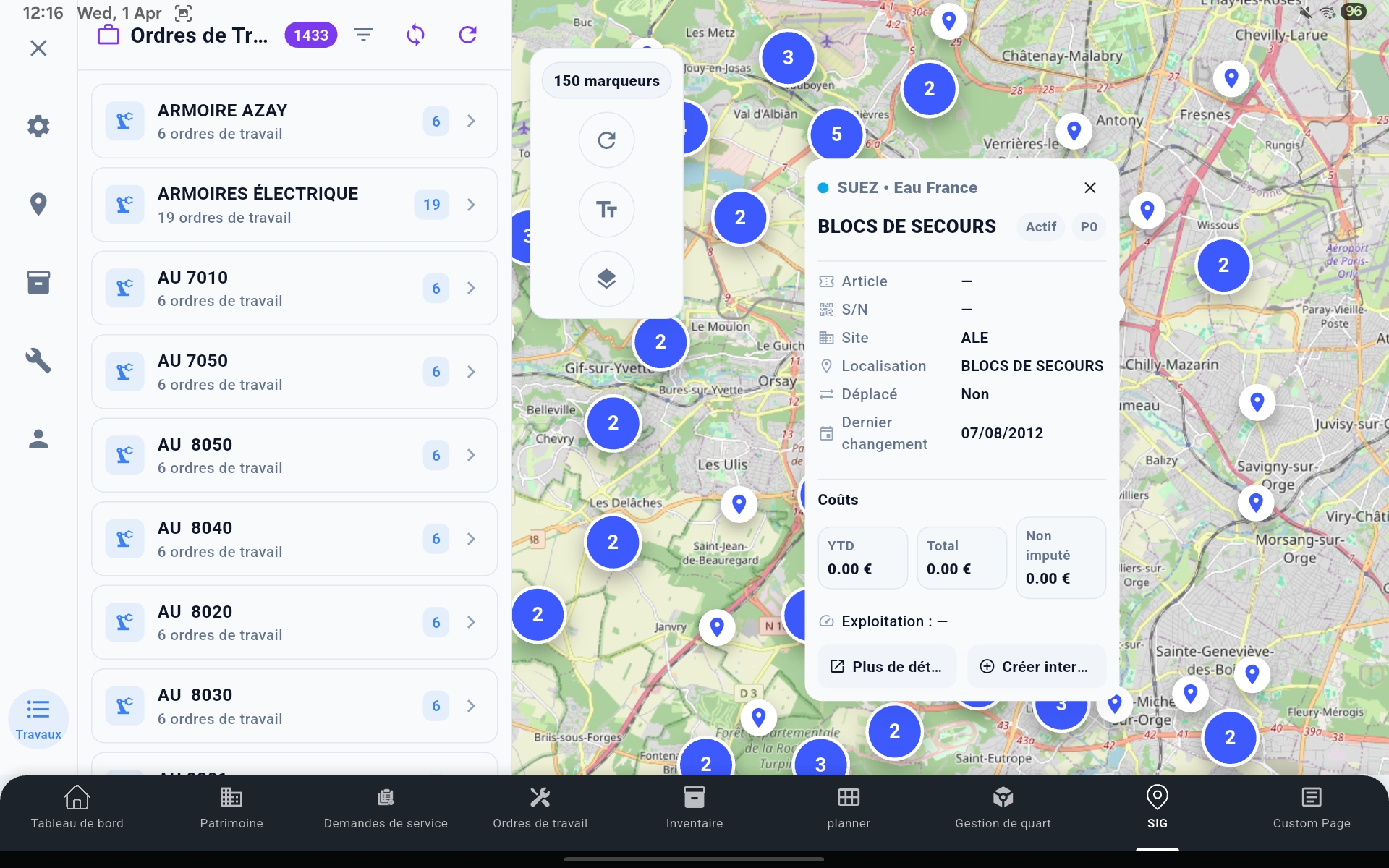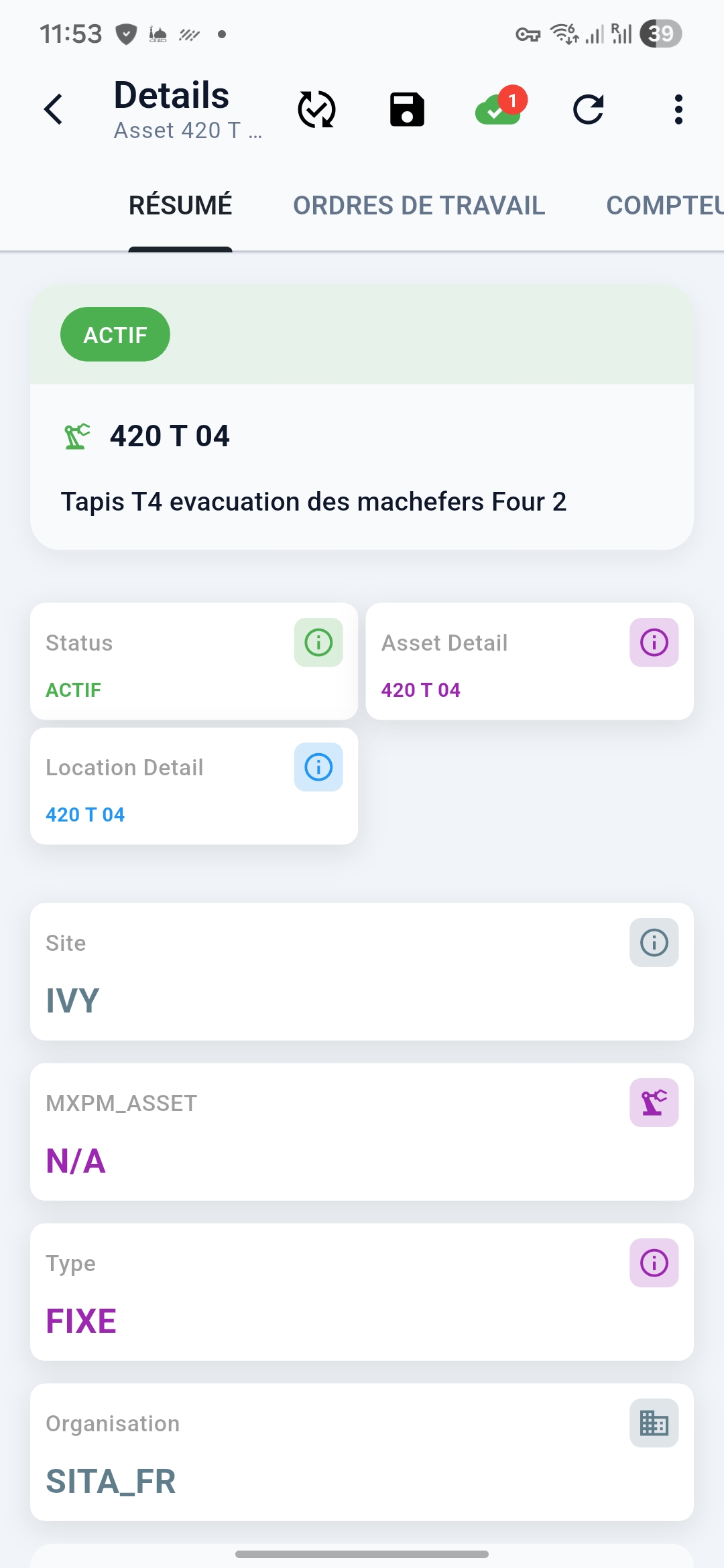
MX-Edge est la plateforme mobile offline-first qui permet à vos techniciens d'exécuter des ordres de travail, capturer des actifs et des transactions de stock — même sans réseau — et synchronise tout nativement avec Maximo MAS.
Six capacités qui font de MX-Edge la référence pour l'exécution terrain IBM Maximo — conçu avec les directeurs de maintenance, les planificateurs et les équipes IT, pas contre eux.
Les techniciens continuent à travailler quand la connexion est perdue. Cycle de vie complet des OT en local, avec synchronisation sans conflit vers Maximo à la reconnexion.
Écrans, workflows et règles métier configurés visuellement — sans développement spécifique. Votre équipe IT déploie des changements en jours, pas en trimestres.
Tableaux de planification visuels avec heatmaps de charge, correspondance des compétences et avancement terrain en temps réel — bidirectionnel avec les OT Maximo.
Intégration bidirectionnelle profonde avec IBM Maximo Application Suite. Sans middleware, sans connecteurs sur-mesure — fidélité des données en temps réel de bout en bout.
Intelligence opérationnelle à chaque niveau — disponibilité des actifs, débit des OT, productivité des techniciens — depuis un cockpit mobile et web unifié.
SSO, RBAC, stockage local chiffré, piste d'audit complète et contrôles de gouvernance IT — conçu pour satisfaire les audits de sécurité les plus exigeants.
MX-Edge connecte techniciens, planificateurs et équipes IT dans un tissu opérationnel offline unique — modulaire et natif Maximo.
La couche d'orchestration centrale. Gère la réplication offline, la résolution de conflits et la synchronisation temps réel avec IBM Maximo MAS. Les techniciens exécutent les OT, saisissent les relevés, gèrent les pièces et complètent les checklists sécurité — avec ou sans réseau.
Planification de maintenance par glisser-déposer avec capacité ressources, priorisation des OT et avancement terrain en temps réel.
Tableaux de bord opérationnels avec KPIs sur la fiabilité des actifs, l'exécution des travaux et la conformité maintenance sur tous les sites.
Configuration sans code. Concepteur d'écrans, générateur de workflows et moteur de règles métier — adaptez MX-Edge à votre Maximo sans développement.
Couche SIG offline avec localisation des actifs, optimisation des tournées et affectation spatiale des OT pour les opérations à grande échelle.
Conçu spécifiquement pour l'exécution maintenance sur IBM Maximo — sans les compromis des plateformes mobiles génériques.
Cycle de vie complet des OT Maximo — créer, affecter, exécuter, clôturer — avec gestion des tâches, rapport main d'œuvre et suivi statut offline.
Consultez, inspectez et mettez à jour les fiches actifs avec relevés compteurs, évaluations état et rapports de défaillance — directement du terrain.
Sortez des matières, réservez des pièces et gérez les mouvements de magasin par scan code-barres/QR — synchronisé avec le stock Maximo en temps réel.
Joignez photos, vidéos et notes vocales aux OT et actifs. Stocké localement et synchronisé vers Maximo à la reconnexion — zéro perte de données.
Protocoles sécurité configurables, procédures de consignation/déconsignation et permis de travail — appliqués directement dans le flux d'exécution mobile.
Cartes offline avec couches actifs superposées. Naviguez sur les grands sites et localisez les actifs avec GPS et positionnement intérieur.
Alertes temps réel pour nouvelles affectations, escalades de priorité et demandes de validation — fiables même en mauvaise connectivité.
Tableaux de bord KPI techniciens et superviseurs avec widgets configurables, graphiques de tendance et indicateurs de performance par site.
Les demandeurs internes et les citoyens soumettent des DS directement depuis le mobile. Workflow de validation complet intégré à la gestion DS Maximo.
Notre méthodologie éprouvée élimine les risques et les coûts des projets mobiles EAM traditionnels. Passez en production sereinement — avec une équipe interne qui maîtrise la plateforme.
Évaluation de votre version Maximo/MAS, modèle de données, politiques de sécurité et topologie réseau. Définition de l'architecture d'intégration et du périmètre de synchronisation avec votre équipe IT.
Configuration des écrans, workflows et règles métier MX-Edge via MX-Studio. Zéro développement spécifique — adaptation à votre configuration Maximo exacte.
Connexion aux APIs Maximo MAS, configuration SSO et mappings RBAC, et finalisation de la revue sécurité IT avec votre équipe de gouvernance.
Déploiement auprès d'un groupe pilote de techniciens terrain et planificateurs. Tests de recette utilisateur avec de vrais OT dans votre environnement Maximo.
Généralisation complète en production avec hypercare dédiée. Formation, gestion du changement et monitoring 30 jours post-mise en production inclus.
Fourchettes indicatives sur des déploiements utilities, industriels et immobiliers — mesurées 6 mois après la mise en production.
Déployé auprès de 280 techniciens terrain. Élimination des OT papier, avec 94 % de succès de synchronisation au premier passage dans des environnements offline couvrant 12 000 km² d'infrastructure.
Réduction du backlog de maintenance de 43 % en 6 mois grâce à la planification par glisser-déposer MX-Planner sur 5 sites de production avec 180 agents de maintenance.
Atteint 99,2 % de conformité SLA pour 2 400 actifs gérés dans 68 bâtiments grâce à l'exécution offline-first MX-Edge et le monitoring KPI temps réel.
Obtenez une démonstration personnalisée de 30 minutes avec un architecte solution Sinorfi. Nous adaptons la démo à votre version Maximo, vos scénarios terrain et vos exigences sécurité.